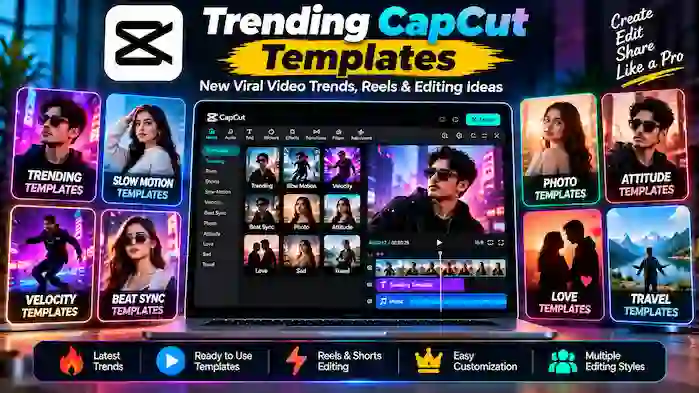
Trending CapCut templates make it easier to create short-form videos based on popular editing styles, transitions, music, effects, and visual formats. Instead of building an entire edit from scratch, creators can start with a ready-made template and customize it with their own photos or videos.
Trending styles can change quickly, especially across short-form platforms. A template that is popular today may be replaced by a new format tomorrow. This guide explains how trending CapCut templates work, popular categories, how to choose the right template, and how to create better trend-based videos.
What Is a Trending CapCut Template?
A trending CapCut template is a pre-designed video editing project associated with a popular style, music trend, transition, effect, or social media format.
A template can include:
- Pre-set clip timing
- Transitions
- Visual effects
- Filters
- Text animation
- Music synchronization
- Speed changes
- Photo placeholders
- Video placeholders
Users can add their own media to create a video that follows the template’s general structure.
Why Are Trending CapCut Templates Popular?
Short-form video trends often depend on timing and recognizable editing styles.
Trending templates can help creators:
- Save editing time
- Follow current styles
- Create short-form videos quickly
- Experiment with new transitions
- Produce Reels and Shorts
- Get editing inspiration
- Turn photos into videos
- Synchronize clips with music
A template can provide the structure, while the creator’s media gives the final video its own identity.
How Trending CapCut Templates Work
A typical template contains an existing editing structure.
For example, a template may contain ten placeholders with specific timings. When you select your own ten photos or videos, CapCut places them into the corresponding sections.
The template may then automatically apply:
- Transitions
- Timing
- Effects
- Animations
- Music synchronization
- Text placement
The final result depends on both the template and the media you provide.
Popular Trending CapCut Template Categories
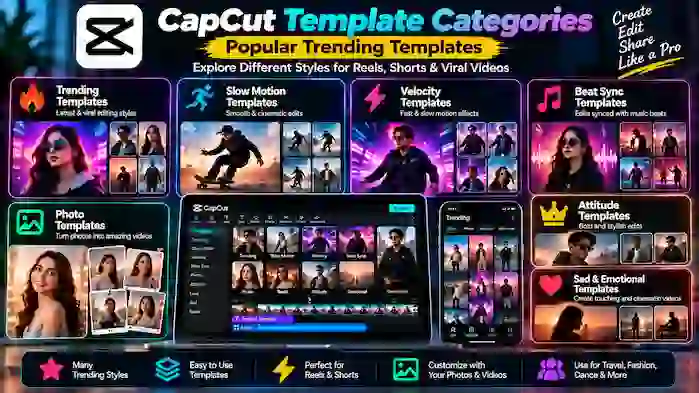
Different trends become popular at different times. However, several categories consistently attract attention.
Trending Slow Motion Templates
Slow-motion templates use speed changes to create dramatic or cinematic edits.
They can work well for:
- Sports clips
- Fashion videos
- Travel footage
- Portrait videos
- Dance clips
- Scenic shots
Velocity CapCut Templates
Velocity templates combine fast and slow sections to create a rhythmic editing style.
They are often synchronized with music and can include zooms, transitions, and visual effects.
Beat-Sync Templates
Beat-sync templates change clips or effects according to the rhythm of the music.
They are commonly used for:
- Photo edits
- Dance videos
- Music videos
- Travel edits
- Short montages
Photo Trend Templates
Photo templates allow creators to turn multiple images into a short video.
They can include animated transitions, music, filters, and text.
Instagram Reels Templates
Trending CapCut templates can be useful for creating short vertical videos for Instagram Reels.
The best template depends on the content, audience, and current trend rather than simply choosing the newest available option.
Attitude Templates
Attitude-style templates often use bold transitions, text, music, and dramatic effects.
They are commonly used for short personal edits and portrait videos.
Sad and Emotional Templates
Emotional templates generally use slower pacing, softer transitions, and music to create a particular mood.
They can work well for memories, personal stories, travel moments, or photo montages.
Trending CapCut Templates for Instagram Reels
Instagram Reels rely heavily on short, visually engaging content.
A suitable CapCut template can help organize clips around music and transitions.
For Reels, look for templates with:
- Vertical formatting
- Clear visual timing
- Short clip sections
- Readable text
- Appropriate music
- Simple transitions
- Strong opening visuals
The first few seconds are especially important because viewers can quickly scroll to another video.
Trending CapCut Templates for Shorts
YouTube Shorts also work well with short templates.
A template can help creators quickly produce:
- Photo Shorts
- Music edits
- Gaming clips
- Travel videos
- Before-and-after videos
- Quick tutorials
- Highlight videos
Choose a template that supports the video’s subject rather than using a trend simply because it is popular.
New Trending CapCut Templates
Searches for CapCut new trending templates usually indicate that users want recently popular editing styles.
New templates can become popular because of:
- A new song
- A social media challenge
- A visual effect
- A transition style
- A creator trend
- A new editing technique
- A seasonal event
Because trends change quickly, creators should check the current CapCut template library for the newest available options.
How to Find Trending CapCut Templates
You can search for templates based on the editing style you want.
Useful search terms include:
- Trending CapCut template
- New CapCut template
- CapCut template trending
- New trend CapCut template
- CapCut viral template
- Trending template for Reels
- CapCut slow-motion template
- CapCut velocity template
- CapCut beat-sync template
- CapCut photo template
Specific searches can save time because they narrow the results to the style you actually need.
How to Choose a Trending CapCut Template
Popularity should not be the only factor.
Check the Number of Required Clips
Some templates require only a few clips, while others may require a large collection of photos or videos.
Match the Template to Your Content
A travel video needs a different structure from a gaming montage or portrait edit.
Check the Timing
Fast templates may not work well with footage that needs more time to understand.
Consider the Music
If the template is based heavily on a particular song or rhythm, make sure the audio style fits your content.
Review the Preview
Watch the complete template before adding your media. This helps you understand how your clips will appear.
How to Use a Trending CapCut Template
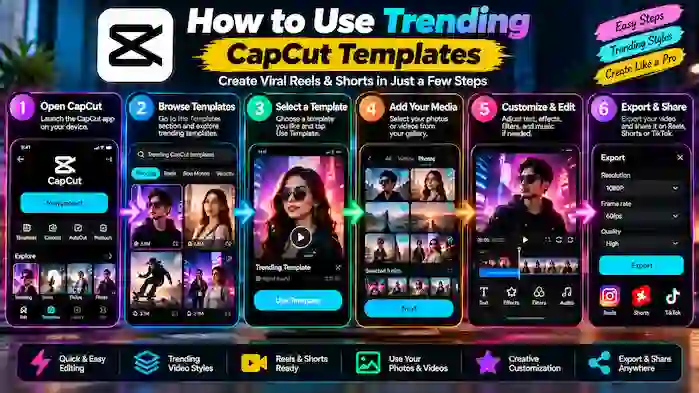
The interface can vary between versions and devices, but the general workflow is straightforward.
- Find a suitable template.
- Open it through the supported CapCut experience.
- Check how many photos or videos it requires.
- Select your media.
- Add the selected clips to the template.
- Review the resulting edit.
- Adjust available text or other elements.
- Preview the complete video.
- Export the finished project.
Not every template provides the same level of customization.
How to Make a Trending Template More Original
Using a popular template does not mean your video has to look identical to everyone else’s.
You can make the result more personal by:
- Choosing original footage
- Using your own photos
- Selecting clips with better timing
- Changing available text
- Using a different visual story
- Removing unnecessary elements
- Combining suitable editing ideas
The template should support your content instead of replacing your creative decisions.
Trending CapCut Templates for Photos
Photo-based trends are particularly easy to adapt.
You can use photos from:
- Trips
- Events
- Sports
- Friends
- Family activities
- Personal projects
- School activities
- Creative photography
Choose images with similar quality and make sure important subjects are not cropped by the template.
Trending CapCut Templates for Slow Motion
Slow-motion trends can create dramatic results when used with suitable footage.
Good source clips may include movement such as:
- Running
- Jumping
- Sports actions
- Dancing
- Walking
- Outdoor scenes
The effect works best when the original footage contains enough detail and movement to support the speed change.
Trending Velocity Templates
Velocity editing has remained popular because it creates strong changes in rhythm.
A velocity template may combine:
- Fast motion
- Slow motion
- Zoom effects
- Beat synchronization
- Transitions
- Motion effects
When selecting clips, choose footage where the movement works naturally with the template.
Viral CapCut Templates
The word “viral” is frequently used in template searches, but no template can guarantee that a video will become viral.
Performance depends on many factors, including:
- Content quality
- Audience interest
- Timing
- Platform recommendations
- Caption
- Topic
- Originality
- Viewer retention
A popular template can provide a familiar editing style, but it does not guarantee results.
Trending CapCut Templates and Music
Music often plays an important role in short-form trends.
A template may be built around a particular rhythm or audio structure. If the music is changed, the timing of the edit may also feel different.
Always consider whether the audio is suitable for the platform where you plan to publish the video and whether you have the appropriate rights or permissions to use it.
Trending CapCut Templates for Different Platforms
Reels benefit from vertical, fast-paced templates with clear visuals.
YouTube
Shorts can use fast templates, while longer YouTube videos usually require more customized editing.
TikTok-Style Short Videos
Fast transitions, beat synchronization, and recognizable trends can work well for short-form formats.
Short vertical videos, photo montages, and promotional edits can all benefit from suitable templates.
CapCut Trending Template vs General Template
A general CapCut template can remain useful even after a trend disappears.
A trending template is more closely connected to current social media activity.
| General Template | Trending Template |
| Broad editing style | Current trend |
| Can remain useful longer | May change quickly |
| Good for evergreen content | Good for trend-based content |
| Less dependent on current music | Often linked to current audio |
| Focuses on editing structure | Focuses on current popularity |
Both types can be useful depending on your content strategy.
Common Problems With Trending CapCut Templates
A Template Is No Longer Available
Templates can disappear or become unavailable because of platform, creator, regional, or service changes.
The Template Looks Different With Your Media
The preview depends on the original creator’s media. Your photos and videos may produce a different result.
Music Is Unavailable
Audio availability can change because of licensing or regional restrictions.
Template Requires More Clips
Some templates are designed for a specific number of photos or videos. Check the requirements before starting.
The Template Does Not Open
Make sure your CapCut version is current and that you are using a supported account and device.
Trending CapCut Templates and CapCut Pro
Some template resources may be connected to premium CapCut features.
If a template requires Pro access, users should check the current CapCut account requirements rather than relying on unofficial modified applications.
An official Pro subscription, where available, provides a supported way to access eligible premium resources.
Safety Tips for Trending Templates
Trending searches can lead users to third-party websites that claim to provide special template files or modified CapCut applications.
Be cautious with any website that asks you to:
- Install an unknown application
- Enter your CapCut password
- Provide unnecessary personal information
- Download a modified APK
- Disable security features
- Complete suspicious verification steps
Whenever possible, use CapCut’s supported template features and official services.
Frequently Asked Questions
What is a trending CapCut template?
A trending CapCut template is a pre-designed editing project associated with a currently popular video style, music trend, transition, or social media format.
How do I find new CapCut templates?
Search within the supported CapCut template experience and look for recently popular or newly published templates.
Are trending CapCut templates free?
Availability varies. Many templates can be used without a separate payment, while some resources may require Pro access or other conditions.
Can I use trending CapCut templates for Instagram Reels?
Yes. Many vertical templates can be adapted for Instagram Reels when supported by CapCut.
What is a viral CapCut template?
A viral CapCut template is a template associated with a video trend that has received significant attention. However, using a template does not guarantee that a video will go viral.
Can I customize a trending CapCut template?
Yes. Depending on the template, you may be able to replace media, edit text, adjust certain elements, and personalize the final video.
Why did a trending CapCut template disappear?
Availability can change because of creator settings, platform updates, regional availability, licensing, or other service changes.
Are CapCut trending templates safe?
Templates available through supported CapCut features are generally preferable to files or applications offered by unknown third-party websites.
Conclusion
Trending CapCut templates give creators a convenient way to participate in current video-editing trends without building every transition and effect manually. From slow-motion and velocity edits to photo montages, Reels, Shorts, and beat-synchronized videos, templates can speed up the creative process.
However, trends change quickly, and popularity does not guarantee that a template will produce a successful video. The best approach is to choose a template that fits your footage, customize it with original content, and focus on creating a video that provides value to your audience.
For specific template categories, explore dedicated guides for CapCut Pro templates, slow-motion templates, and individual trending template styles.